
Execute Actions against Test Merchants
Test merchants let you run Manage actions and tasks without a real merchant account. Each test merchant represents a common type of company in our system, such as a subscription provider, an aggregator, or a shopping service.
Start by connecting a test merchant company with a test credential, just as you would a real account. Credentials and parameters let you choose the account state or task outcome. You can also run the task on Mocky Subscription under a real company's branding by entering a test credential on a TrueAuth company's sign-in page.
If you are new to PayLink, start with the PayLink overview. The glossary defines the companies, accounts, and tasks used here.
Getting started
Use this guide to verify your PayLink integration before testing with live merchant accounts. Test merchants provide repeatable account data and controlled outcomes, so you can see how your integration handles connections, account changes, actions, and failures without changing a real subscription.
Before you start, you need your API key and secret, a user identifier for the test user, and an app that can launch Transact with a public token. Execute Actions covers the launch.
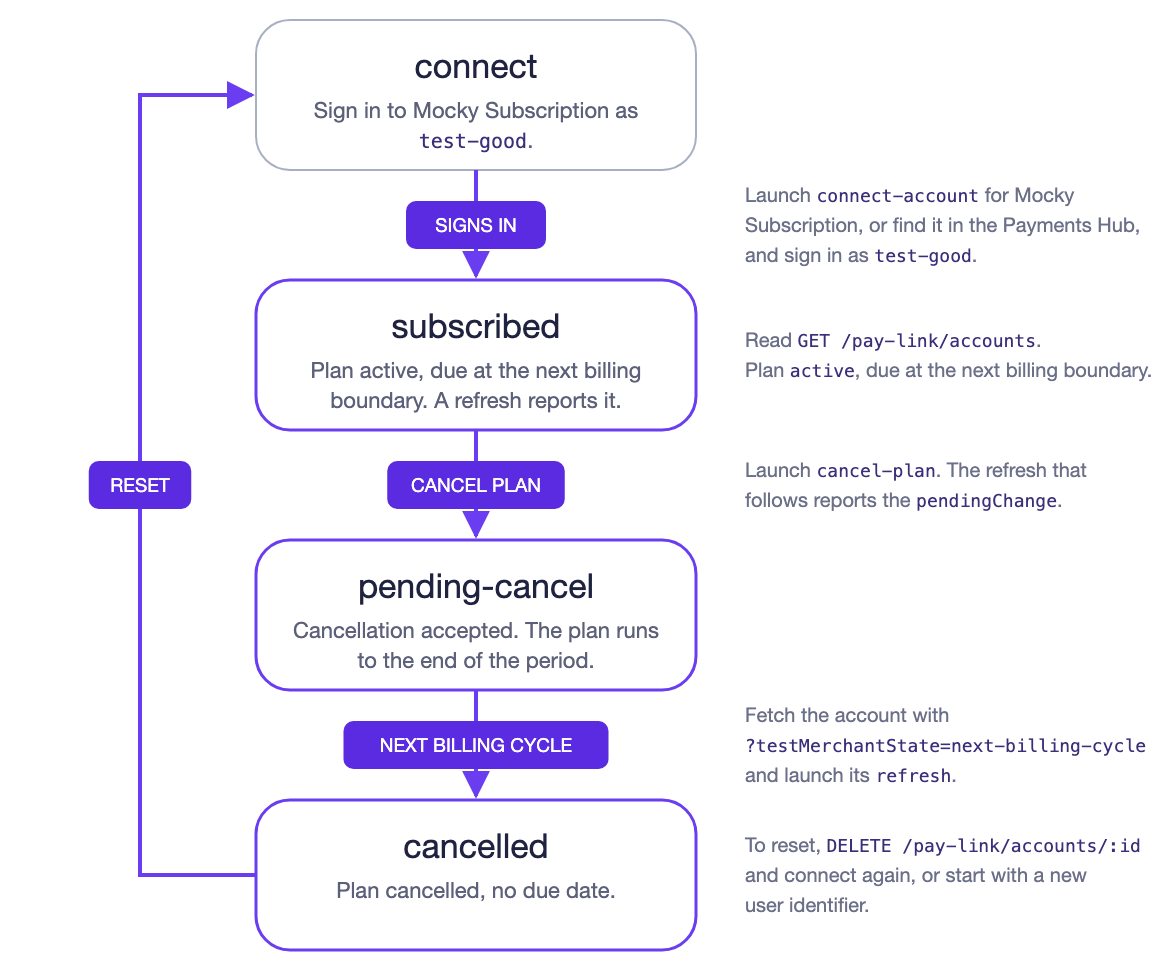
Sign in to Mocky Subscription with test-good, which creates a subscribed account. Cancel the plan, advance one billing cycle to complete the cancellation, then delete the account to reset it. The walkthrough below covers each step.
Variations
Each variation changes one part of the run above. A test credential applies when you sign in, so it sets the account's starting state or fails the connection. The testMerchantState and testFlow query parameters apply to actions: add them when you fetch an account or a company's actions, and every action in the response carries them. They take effect when you launch one of those actions in Transact.
- Connect in a specific state: Sign in as
test-pending-cancel, or fetch the action withtestMerchantState=pending-cancel, to start with a cancellation already scheduled. - Simulate a task failure: Fetch the
cancel-planaction withtestFlow=action-failedto fail the cancellation withpaylink-action-failed. UsetestFlow=system-unavailablewhen fetchingconnect-accountto return an action that fails the connection. - Trigger a required sign-in: Fetch a connected account's actions with
testFlow=reconnect, then launchcancel-plan,pause-plan, orrefresh. Transact opens the merchant's sign-in page before running the action. Other actions ignorereconnect. - Advance a billing cycle: Fetch the account with
testMerchantState=next-billing-cycleand launch itsrefresh. The pending cancellation becomes cancelled. - Reset the account:
DELETE /pay-link/accounts/:id, or use a new user identifier.
Available test merchants
Each test merchant models a common merchant type and returns data and actions for that type. Find them like any other company: search for "Mocky" with Company Search or in the Payments Hub, then connect one with a test credential. The walkthrough uses Mocky Subscription, so start there unless you are testing an aggregator or a shopping service.
All three run on one test connector, Mocky Manage. Whichever you connect, Transact shows the Mocky Manage sign-in page and, for view-account, the Mocky Manage account page.
| Test merchant | Merchant type |
|---|---|
| Mocky Subscription | A basic subscription provider, such as a streaming service, with a single monthly plan. |
| Mocky Aggregator | An aggregator, such as an app store, that manages subscriptions to other services, each with its own bill. |
| Mocky Shopping | A shopping service, such as an online retailer, with orders and a subscription. |
On Mocky Aggregator, a testMerchantState applies to the first subscription, or to the plan an action targets.
Test merchant states
Use testMerchantState to set the account's state for a task. Add it as a query parameter on any endpoint listed under API driven. Every action in the response carries the value, and the task you launch from one of those actions runs with the account in that state. The test merchant saves the new state, so later tasks without the parameter start from it.
The table shows the result of each value and the matching test credential for each named state, in terms of the plan fields in the Get Account response. Values with no credential are set through the API or the Mocky account page. These states also let you reproduce changes that happen outside your integration, such as a user cancelling directly with the merchant.
testMerchantState (test-credential) | Result |
|---|---|
subscribed (test-good) | The plan is active with no pending change and an upcoming dueDate. |
pending-cancel (test-pending-cancel) | The plan is active with a pendingChange to cancelled on the next billing date. |
cancelled (test-cancelled) | The plan is cancelled with no dueDate. Payment history is kept. |
pending-pause (test-pending-pause) | The plan is active with a pendingChange to paused for one cycle, starting on the next billing date. |
paused (test-paused) | The plan is paused with a pendingChange back to active on the resume date. |
next-billing-cycle | The account advances one billing cycle: a pending cancellation becomes cancelled, a pending pause becomes paused, and a paused plan resumes. |
The test merchant mirrors the expected cancel and pause behavior for a real subscription in each account state:
| State | Cancel plan | Pause plan |
|---|---|---|
| subscribed | Completes: the refresh reports a pending cancellation. | Completes: the refresh reports a pending pause. |
| pending-cancel | Completes: no change. | Fails: the subscription is inactive. |
| cancelled | Completes: no change. | Fails: the subscription is inactive. |
| pending-pause | Completes: the cancellation supersedes the pause. | Completes: no change. |
| paused | Completes: the refresh reports a pending cancellation. | Completes: no change. |
By default, the API filters plan actions based on the current plan status. Set ignorePlanStatus=true when listing actions to return all plan actions.
Test flows
Use testFlow to control how a task behaves, separately from the account state. Pass it the same way as testMerchantState: as a query parameter when you fetch actions, so every returned action carries it, or as a test credential when you sign in.
The table shows each value with its matching test credential, and its result. Values with no credential are set through the API. You can combine testFlow with testMerchantState, but a flow may end before the account state is updated.
testFlow (test-credential) | Result |
|---|---|
reconnect | The merchant session needs to be renewed. Transact prompts for sign-in, then the same action continues. Applies to cancel-plan, pause-plan, and a refresh you launch yourself; the refresh that follows an action skips it. |
action-failed (test-action-failed) | The merchant does not confirm the requested change. The task fails for paylink-action-failed. |
unexpected-response (test-unexpected-response) | The merchant returns a response Atomic does not expect and cannot process. |
system-unavailable (test-system-unavailable) | The merchant is unavailable. The workflow ends without a follow-up refresh. |
auth-expired (test-auth-expired) | The merchant session is no longer valid. The workflow ends without a follow-up refresh. |
The Task failures reference lists these and other failure reasons with handling guidance.
A failed refresh leaves the account disconnected. On a previously connected test merchant, a later refresh reconnects without sign-in.
Set up a test scenario
Choose the testing path that matches your PayLink integration: API parameters for API-based integrations, test merchant controls for Payments Hub integrations, or test credentials for TrueAuth integrations that start on a merchant's sign-in page.
API driven
Get Accounts, Get Account, Get Actions for Company, and Create Accounts accept the optional testMerchantState and testFlow query parameters. Call these endpoints without test parameters for the default test-merchant behavior, or include them when you need to specify the account state, task behavior, or both.
Each returned action includes the supplied values. From there, you can launch the selected action in Transact using the standard flow described in Execute Actions.
This example retrieves actions for a connected Mocky Subscription account with a pending cancellation. Launching the returned refresh prompts for sign-in first; view-account opens normally:
curl -X GET "https://sandbox-api.atomicfi.com/pay-link/accounts/ACCOUNT_ID?testMerchantState=pending-cancel&testFlow=reconnect" \
  -H "x-api-key: API_KEY" -H "x-api-secret: API_SECRET" \
-H "user-identifier: USER_IDENTIFIER"{
"account": {
"_id": "ACCOUNT_ID",
"actions": [
{
"actionId": "REFRESH_ACTION_ID",
"type": "refresh",
"automated": true,
"disabled": false,
"isTestAccount": true,
"testMerchantState": "pending-cancel",
"testFlow": "reconnect"
},
{
"actionId": "VIEW_ACCOUNT_ACTION_ID",
"type": "view-account",
"automated": false,
"disabled": false,
"isTestAccount": true,
"testMerchantState": "pending-cancel",
"testFlow": "reconnect"
}
]
}
}Test parameters apply only to test merchants and to accounts whose data came from one, such as a TrueAuth company connected with a test credential. Atomic ignores them on any other account.
Payments Hub
In your Payments Hub integration, search a test merchant. Use test-good for the merchant's default behavior, or other credentials to target different initial state or task behavior. A flow credential applies to the connection itself, so a failing flow fails the sign-in and leaves the account disconnected. To test a failing action on a connected account, set testFlow through the API.
After connecting, open view-account to choose a different account state, advance one billing cycle, or disconnect the account. When the merchant page closes, the refresh that follows applies your choice.
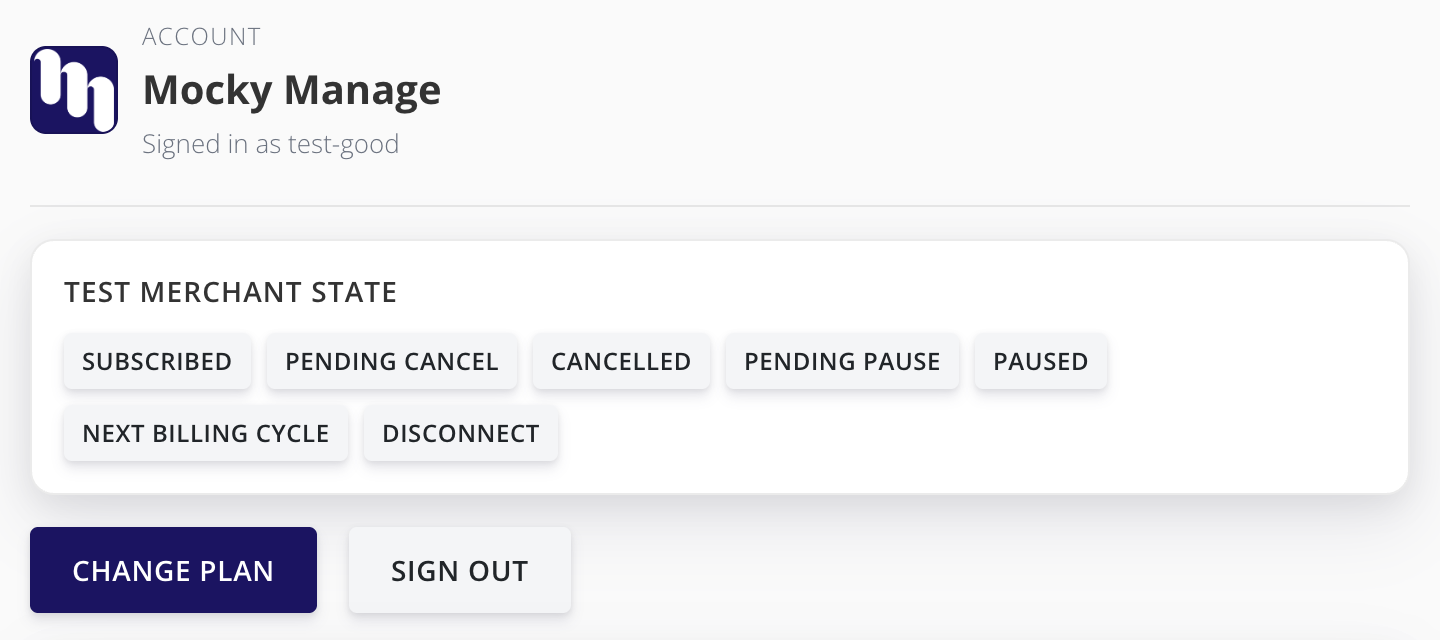
Merchant sign-in page
Test credentials also let you exercise the normal company selection and sign-in flow in your existing PayLink integration without real credentials. On a company that signs in with TrueAuth, enter a test credential on the company's own sign-in page, and the task runs against the Mocky Subscription test merchant under that company's name. Use test-good for the default behavior or another credential for a specific initial state or task behavior.
Companies that use standard sign-in in Transact send test credentials to a generic test connector instead. It ignores the account state credentials, so test those scenarios on Mocky Subscription directly.
A reconnect test flow on this account opens the original merchant's sign-in page and accepts test-good only. Other test credentials apply only at the first connection; later scenarios can use view-account or API parameters.
Combining inputs
You can set an account state and task behavior together. If an input is supplied in more than one place, this is the priority in which they are applied:
Account state
testMerchantStateset through the API.- The choice made through
view-account. - A credential entered during sign-in.
- The saved state, or the merchant's default for a new connection.
Task behavior
testFlowother thanreconnectset through the API.- A flow credential entered during sign-in.
reconnectset through the API.- Normal behavior.
Walkthrough
This walkthrough uses the API and Transact to follow the Getting started flow with Mocky Subscription. You will connect with test-good, cancel the plan, advance one billing cycle, confirm the cancellation, then reset the account.
Each step shows the API request, what the user does in Transact, and what your backend should check. Responses are trimmed to the fields used by the next step.
Names in capitals are placeholders. Replace API_KEY, API_SECRET, and USER_IDENTIFIER with your own values. The rest, such as COMPANY_ID or CANCEL_PLAN_ACTION_ID, stand for values from an earlier response in the walkthrough.
1. Find Mocky Subscription
Use Company Search to find Mocky Subscription. The response includes its _id, used as COMPANY_ID in later requests.
curl -X POST "https://sandbox-api.atomicfi.com/company/search" \
  -H "x-api-key: API_KEY" -H "x-api-secret: API_SECRET" \
  -H "Content-Type: application/json" \
-d '{ "query": "Mocky", "scopes": ["pay-link"] }'{
"data": [
{
"_id": "COMPANY_ID",
"name": "Mocky Subscription"
}
]
}2. Create a public token
Call the Create Access Token endpoint for USER_IDENTIFIER. Use the returned PUBLIC_TOKEN to launch Transact, and include the same identifier in the user-identifier header on later PayLink requests.
curl -X POST "https://sandbox-api.atomicfi.com/access-token" \
  -H "x-api-key: API_KEY" -H "x-api-secret: API_SECRET" \
  -H "Content-Type: application/json" \
-d "{ \"identifier\": \"USER_IDENTIFIER\" }"{
"data": {
"publicToken": "PUBLIC_TOKEN"
}
}3. Connect Mocky Subscription
Call Get Actions for Company for COMPANY_ID using USER_IDENTIFIER, then select the returned connect-account action.
curl -X GET "https://sandbox-api.atomicfi.com/pay-link/actions-for-company/COMPANY_ID" \
  -H "x-api-key: API_KEY" -H "x-api-secret: API_SECRET" \
-H "user-identifier: USER_IDENTIFIER"{
"actions": [
{
"actionId": "CONNECT_ACCOUNT_ACTION_ID",
"type": "connect-account",
"automated": true
}
]
} Launch Transact with the connect-account action ID and PUBLIC_TOKEN, as described in Execute Actions:
{
  "scope": "pay-link",
  "publicToken": "PUBLIC_TOKEN",
  "tasks": [
    {
      "operation": "action",
      "action": {
        "id": "CONNECT_ACCOUNT_ACTION_ID"
      }
    }
  ]
}
Transact opens the Mocky Manage sign-in page. Enter test-good and any password to connect Mocky Subscription in its default subscribed state.
After either the task-status-updated webhook or onTaskStatusUpdate event reports completed, fetch the account with Get Accounts, filtered to COMPANY_ID. Use its _id as ACCOUNT_ID and its cancel-plan action ID as CANCEL_PLAN_ACTION_ID in the next steps.
curl -X GET "https://sandbox-api.atomicfi.com/pay-link/accounts?companyId=COMPANY_ID" \
  -H "x-api-key: API_KEY" -H "x-api-secret: API_SECRET" \
-H "user-identifier: USER_IDENTIFIER"{
"accounts": [
{
"_id": "ACCOUNT_ID",
"connectionStatus": "connected",
"bills": [
{
"actions": [
{
"actionId": "CANCEL_PLAN_ACTION_ID",
"type": "cancel-plan",
"automated": true
}
],
"plans": [
{
"status": "active"
}
]
}
]
}
]
}4. Cancel the plan
Launch Transact again with the account's cancel-plan action ID:
{
  "scope": "pay-link",
  "publicToken": "PUBLIC_TOKEN",
  "tasks": [
    {
      "operation": "action",
      "action": {
        "id": "CANCEL_PLAN_ACTION_ID"
      }
    }
  ]
}
Atomic runs a refresh as its own task after cancel-plan. Its task-status-updated webhook has the same taskWorkflow as the cancel, and the pay-link-accounts-updated webhook arrives once the refresh finishes. Wait for that webhook, then repeat the Get Accounts request from step 3.
{
  "accounts": [
    {
      "_id": "ACCOUNT_ID",
      "connectionStatus": "connected",
      "actions": [
        {
          "actionId": "REFRESH_ACTION_ID",
          "type": "refresh",
          "automated": true
        },
        {
          "actionId": "VIEW_ACCOUNT_ACTION_ID",
          "type": "view-account",
          "automated": false
        }
      ],
      "bills": [
        {
          "name": "Mocky Subscription",
          "plans": [
            {
              "status": "active",
              "pendingChange": {
                "status": "cancelled",
                "startDate": "NEXT_BILLING_DATE"
              }
            }
          ]
        }
      ]
    }
  ]
}
The account is now pending-cancel, and the API no longer returns cancel-plan or pause-plan because the plan is already scheduled to cancel.
5. Advance a billing cycle
Mocky Subscription schedules the cancellation for the end of the current billing period. To reach that boundary without waiting, fetch the account with testMerchantState=next-billing-cycle.
curl -X GET "https://sandbox-api.atomicfi.com/pay-link/accounts/ACCOUNT_ID?testMerchantState=next-billing-cycle" \
  -H "x-api-key: API_KEY" -H "x-api-secret: API_SECRET" \
-H "user-identifier: USER_IDENTIFIER"{
"account": {
"_id": "ACCOUNT_ID",
"actions": [
{
"actionId": "NEXT_CYCLE_REFRESH_ACTION_ID",
"type": "refresh",
"automated": true,
"testMerchantState": "next-billing-cycle"
},
{
"actionId": "NEXT_CYCLE_VIEW_ACCOUNT_ACTION_ID",
"type": "view-account",
"automated": false,
"testMerchantState": "next-billing-cycle"
}
]
}
} Every action returned by this request includes testMerchantState=next-billing-cycle. Launch the returned refresh action (NEXT_CYCLE_REFRESH_ACTION_ID) in Transact. It is a different ID from the plain refresh in step 4, because the action ID carries the test state.
Test merchant dates stay relative to the day each task runs. Advancing a billing cycle shifts payment history back one month instead of creating future-dated data.
6. Confirm the cancellation
After the refresh reports completed, repeat the Get Accounts request from step 3.
{
  "accounts": [
    {
      "_id": "ACCOUNT_ID",
      "connectionStatus": "connected",
      "actions": [
        {
          "actionId": "REFRESH_ACTION_ID",
          "type": "refresh",
          "automated": true
        },
        {
          "actionId": "VIEW_ACCOUNT_ACTION_ID",
          "type": "view-account",
          "automated": false
        }
      ],
      "bills": [
        {
          "name": "Mocky Subscription",
          "plans": [
            {
              "status": "cancelled"
            }
          ]
        }
      ]
    }
  ]
}
The plan no longer has a pendingChange. A later refresh without test parameters keeps it cancelled.
7. Reset
To reset Mocky Subscription and repeat the full connection flow, call Delete Account with ACCOUNT_ID. This removes the account and its bills so you can start again from step 3 with the same COMPANY_ID.
curl -X DELETE "https://sandbox-api.atomicfi.com/pay-link/accounts/ACCOUNT_ID" \
  -H "x-api-key: API_KEY" -H "x-api-secret: API_SECRET" \
  -H "user-identifier: USER_IDENTIFIER"
You can also continue testing without resetting this account:
- Return it to
subscribedwithview-accountortestMerchantState=subscribedon a refresh, then fetch its current actions. - Create a public token for a new
USER_IDENTIFIERfor an isolated run.
Deleting an account does not invalidate action IDs already issued for it. Reusing one can be useful for deep-link or reconnect testing, but fetch new actions for a clean repeat.