
Cancel Subscriptions from an AI Agent
This guide shows how to build an AI agent that helps users cancel subscriptions with the Atomic API and Transact SDK. The agent finds the subscription and offers a button to open Transact, where the user can sign in and confirm the cancellation. Atomic completes automated cancellations with the merchant; for interactive actions, the user finishes on the merchant's own page.
The guide follows an example app with a mobile chat interface and a server that runs the agent. Clone it and follow the setup instructions to try the flow against the Atomic sandbox, or use its code as a starting point for your own integration. The same API calls and Transact handoff work with other agent frameworks, models, and apps. The guide also identifies handling you'll need to add for production.
If you're new to Atomic, start with the PayLink overview for how Atomic connects to merchants and subscription services. The PayLink glossary explains the companies, accounts, bills, plans, actions, and tasks you'll work with in this guide.
Architecture
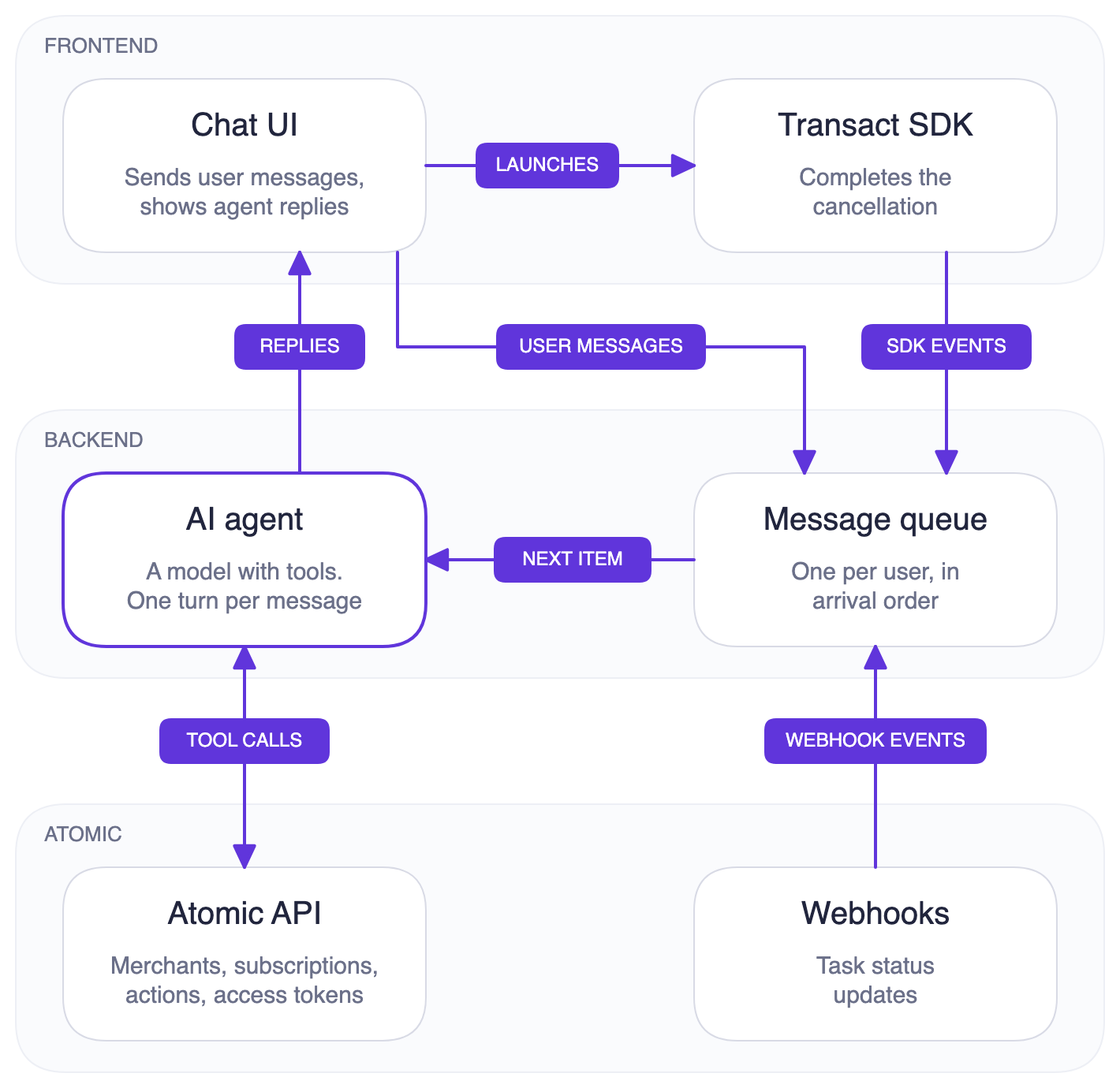
The frontend handles the chat and opens Transact, while the backend runs the agent and connects it to Atomic. All Atomic API calls go through the backend, which holds your API key and secret and receives the webhooks that report task results.
Your backend runs the tools
The agent uses backend functions, called tools, to look up subscriptions and prepare actions for the user. The model chooses which tool to call and works with the company and action IDs it returns, while the backend supplies the credentials and user context. In your integration, derive userIdentifier and conversationId from the authenticated session so the model cannot choose whose account to use. API keys stay on the server, public tokens go to the app, and the user enters merchant credentials inside Transact.
The app opens Transact
Transact is Atomic's embedded interface for connecting to merchants and carrying out actions. In this example, the mobile app includes the native Transact SDK, which opens the screens where the user signs in, completes any required multi-factor authentication, and confirms the cancellation. The chat helps the user choose what to cancel, then hands them to Transact for these merchant interactions. Passwords and authentication codes stay out of the conversation with the agent.
To prepare that handoff, the agent calls get_action_config with the selected action. The backend creates a public token for the user's Atomic session and combines it with the action ID in a launch configuration. It sends this configuration directly to the app alongside the agent's reply, and the app displays a button to open Transact. The model receives only a notice that the button is ready. Preparing the configuration does not start the cancellation.
When the user taps the button, the app launches the SDK with that configuration, taking them directly to the selected action. Atomic runs an automated cancellation after the user completes the required steps; an interactive action opens the merchant's page for the user to finish there. When the user finishes or closes Transact, SDK callbacks let the app resume the chat and prompt the agent to check progress. The backend uses task webhooks to establish the outcome, as described below. Your app needs to handle both the launch and these callbacks, which are covered in the Transact SDK reference.
Results come back to the agent
Atomic sends task-status-updated webhooks as each task starts and finishes, including the refresh that follows a cancellation. The backend stores these results and queues finished-task events for the agent to report to the user. When the user leaves Transact, the app also forwards the fields the agent uses from the SDK's onFinish or onClose payload, prompting the agent to check the stored results. The user doesn't see these event messages, but they can receive a progress update or outcome without having to ask. In the example, events and user messages share a queue for each user, so the agent handles one turn at a time. The example repo explains how the queue works.
Tools
The example's seven tools cover company lookup, subscription discovery, Transact launch, and task results. Their names, descriptions, and input schemas are available at https://docs.atomicfi.com/agent-tools/subscriptions/tools.json. The Tool Definitions page covers the download and file format. The example repo contains the handlers and system prompt that explain how to use their results.
| Tool | What it does |
|---|---|
upsert_user | Creates the Atomic user if needed at the start of each conversation. Calls POST /access-token |
find_company | Searches for a company by name and says whether Atomic supports subscription cancellations there. Calls POST /company/search |
list_cancellable_companies | Lists companies where Atomic supports cancelling a plan. |
get_user_subscriptions | Shows the user's connected accounts, with the bills and plans Atomic found on each. Calls GET /pay-link/accounts |
get_actions_for_company | Gets the available cancel-plan and connect-account actions for the user at a merchant, including cancellations for specific subscriptions. |
get_action_config | Creates a public token and launch configuration for a cancel-plan or connect-account action. The app displays a button to open Transact. Calls POST /access-token |
check_events | Reads the latest task statuses from stored webhooks so the agent can report cancellation progress and results. No Atomic API call. It reads the backend's database. |
Set up the example
Follow the example's setup instructions to run the server and mobile app. Use sandbox API credentials and point the API client and Transact SDK at the same environment. The mobile app needs an Expo development build with native Transact support.
At startup, the server opens an ngrok tunnel with your NGROK_AUTHTOKEN and registers <tunnel URL>/webhooks/atomic/manage-agent for task-status-updated, then deletes the endpoint on shutdown. Your sandbox API keys need permission to list API secrets and create and delete webhook endpoints. This endpoint supplies the task results the agent uses to confirm a cancellation, while SDK close and finish events prompt it to check progress.
The example uses one test user, in-memory conversations, and a local SQLite database. For your integration, add authenticated user sessions, durable conversation and event storage, a permanent webhook endpoint, and webhook verification.
Example: cancelling a subscription
Suppose a user types "I want to cancel my Netflix subscription." The following steps trace that request through the example app, from company lookup to the cancellation and refresh results. The model chooses the exact tool calls, so this is one typical path.
1. The message joins the queue
The backend acknowledges the frontend's request as soon as it adds the message to the user's queue. When the agent begins processing it, the backend sends a busy signal over the WebSocket so the app can show a typing indicator. The agent's reply follows over the same connection when the turn is complete.
2. The agent looks up Netflix
The agent works out whether Atomic can cancel Netflix for this user:
upsert_userruns first in every conversation, so Atomic knows the user before any other call.find_companysearches for "Netflix" and confirms that Atomic supports cancellations there.get_actions_for_companyreturns what this user can do at Netflix right now. Here it returns acancel-planaction for the user's Netflix subscription.
A Netflix account holds a single subscription, so the cancellation can go ahead before the user has connected their Netflix account. Merchants such as Apple and Amazon work differently: one account can hold many subscriptions, and Atomic needs to see which ones the user has before it can cancel any of them. For those merchants, get_actions_for_company returns connect-account instead. The agent offers a "Connect Apple" button through get_action_config, and once the user signs in, Atomic can offer a cancel-plan action for each subscription it finds.
After the connection completes, call get_actions_for_company again. If bills are still loading, wait and read again instead of asking the user to sign in again. Offer only enabled actions that match the subscription the user selected.
Some subscriptions can be paid for through another provider. HBO Max, for example, can be billed directly or through Apple, Amazon, Google, or Roku, and the subscription has to be cancelled wherever the user pays for it. Set includeManaged to true on the Company List or Company Search, and each company carries a managedBy list. When that list names a provider other than the company itself, the agent asks where the user pays before it calls get_actions_for_company. If they pay through Apple, the agent connects their Apple account and offers the cancel-plan action on the HBO Max bill it finds there.
A company with the status under-maintenance can still accept some actions. Its underMaintenanceProductsAndActions field lists the ones that are unavailable; when the field is missing or empty, the whole company is unavailable. If cancel-plan or connect-account is listed, the agent tells the user to try again later instead of offering the action.
An action's automated field determines how the cancellation finishes. When it is false, explain that Transact will open the merchant's page and the user will complete the cancellation there. The Netflix walkthrough below follows an automated cancellation.
3. The agent offers a cancel button
With the cancellation action selected, the agent passes its actionId, type, company name and, optionally, the company's logo to get_action_config. The tool creates a public token and builds the Transact configuration shown below, which the backend sends to the app. Its response to the model says only that the button is ready.
{
  "scope": "pay-link",
  "publicToken": "PUBLIC_TOKEN",
  "tasks": [
    {
      "operation": "action",
      "action": {
        "id": "CANCEL_PLAN_ACTION_ID"
      }
    }
  ]
}
The agent replies with something like "I can cancel your Netflix plan. Tap Cancel Netflix to continue." The backend sends the reply and the configuration over the WebSocket, the frontend shows a "Cancel Netflix" button, and the busy signal clears.
4. The user cancels in Transact
When the user taps the button, the frontend launches the Transact SDK with that configuration. The user signs in to Netflix and Atomic runs the cancellation.
Atomic sends a task-status-updated webhook when the cancellation starts, with the status processing, and another when it finishes, with completed or failed and a reason when it fails. The backend saves each one and queues the finished one for the agent.
Right after the cancellation finishes, Atomic runs a refresh task to resync the user's Netflix data, such as the plan's new status. The refresh sends the same two webhooks, and once it completes, the new data is ready to read.
5. The agent reports the outcome
As cancellation and refresh results arrive through the queue, the agent explains what they mean for the user's subscription:
- The cancellation completes. The cancellation went through, and the account is being resynced to confirm it.
- The refresh completes. The agent calls
get_user_subscriptions, checks that the Netflix plan now shows ascancelledorinactive, or has a cancellation inpendingChange. For a scheduled cancellation, the agent explains that the plan stays active untilpendingChange.startDate. If it still looks active without that change, the agent says the cancellation was submitted but does not show on the account yet. - The cancellation fails. The agent explains what went wrong based on the webhook's reason, such as the user's Netflix sign-in expiring, and offers to try again. A retry needs a new
get_action_configcall after the user agrees. An in-progress cancellation should be allowed to finish before offering a retry. - The refresh fails. The cancellation went through, but the user's account data couldn't be read to confirm it.
When the user leaves Transact
Leaving Transact also prompts a progress check. The frontend forwards the fields the agent uses from the SDK's onFinish payload when the user reaches the success screen, or onClose when they close it before starting the cancellation or while it's running. The agent then calls check_events to look for a matching task and report its current status. A missing webhook leaves the result unconfirmed, even after an SDK finish event. For your integration, keep that attempt pending and reconcile its task status on your backend before deciding whether a retry is appropriate.
Closing Transact does not immediately stop a running cancellation, so don't offer a retry while its outcome is unknown. For expired-token or unauthorized close reasons, offer a new session. The app removes the old button when Transact closes, so an agreed retry requires another get_action_config call.
Matching results and handling webhook delivery
The queue lets the agent process events one at a time with the conversation so far. Its instructions tell it to avoid repeating outcomes and to match recent tasks by company within a 15-minute window. These are model instructions, so for your integration, persist task IDs with the user and action and correlate cancellation and refresh results on your backend before reporting an outcome. Two attempts at the same company can otherwise be mistaken for one another, even if the agent handles their messages in sequence.
Webhooks can arrive late, arrive out of order, or fail delivery. Atomic makes up to three delivery attempts, 30 seconds apart, using the same ce-id for each attempt. Use that ID to ignore duplicates, and preserve a task's completed or failed status if an older update arrives later. A missing event does not establish whether the cancellation reached the merchant.