
Switch Direct Deposit from an AI Agent
This guide shows how to build an AI agent that helps users move their paycheck's direct deposit to their account at your bank with the Atomic API and Transact SDK. The agent finds the employer or payroll system that pays the user, confirms how much of the paycheck to move, and offers a button to open Transact, where the user signs in to their payroll account and confirms the switch. When Atomic can find the user's payroll account through CoAuth, the user confirms with a code from their payroll system instead of a password.
The guide follows an example app with a mobile chat interface and a server that runs the agent. Clone it and follow the setup instructions to try the flow against the Atomic sandbox, or use its code as a starting point for your own integration. The same API calls and Transact handoff work with other agent frameworks, models, and apps. The guide also identifies handling you'll need to add for production.
If you're new to Atomic's deposit product, start with the Deposit implementation guide for how a direct deposit switch works without an agent.
Architecture
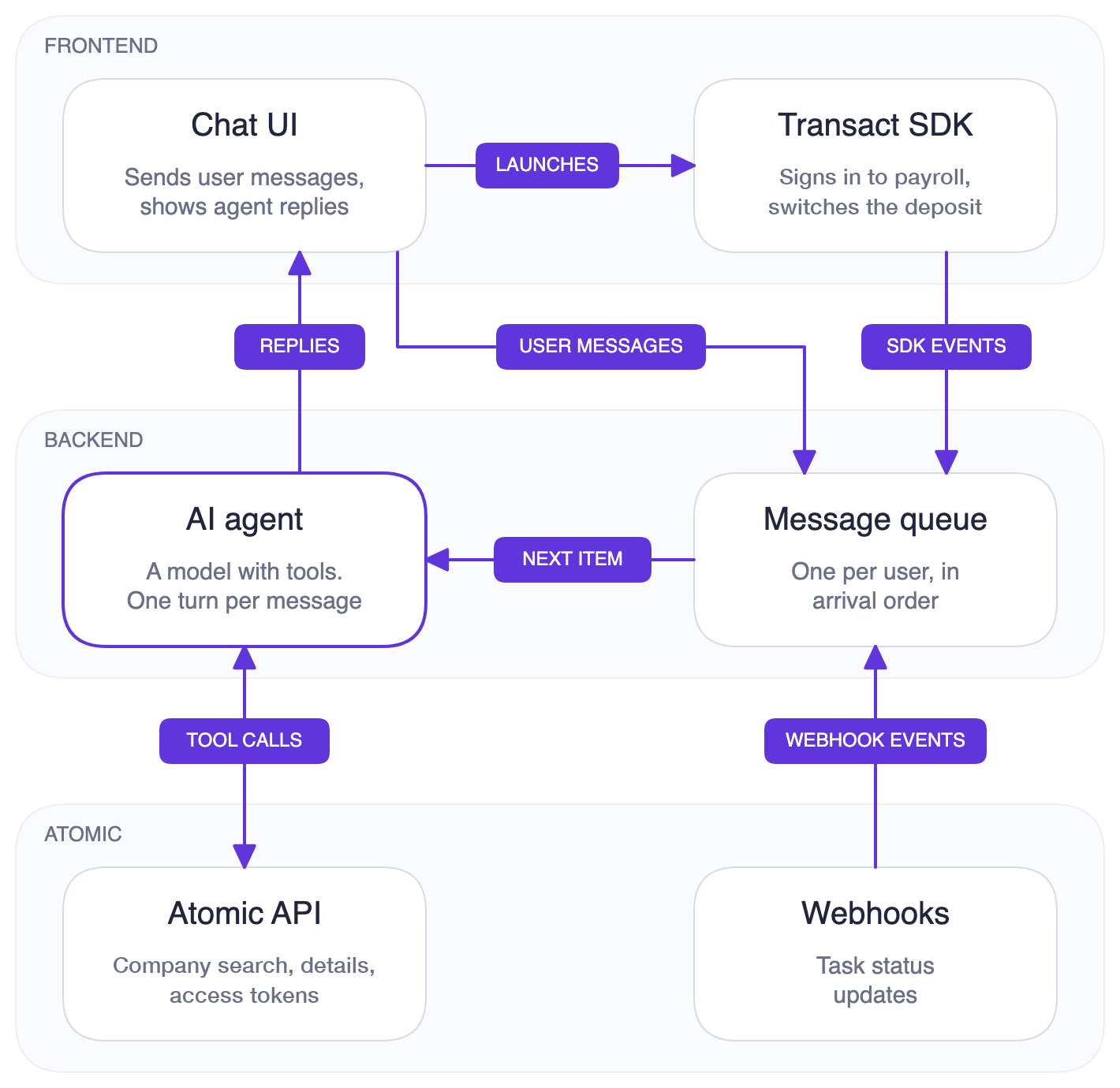
The frontend handles the chat and opens Transact, while the backend runs the agent and connects it to Atomic. All Atomic API calls go through the backend, which holds your API key and secret and receives the webhooks that report task results.
Your backend runs the tools
The agent uses backend functions, called tools, to find who pays the user and prepare the switch. The model chooses which tool to call and works with the company and connector IDs it returns, while the backend supplies everything about the user: the user identifier, the account the paycheck goes to, and the identity details CoAuth uses. In your integration, derive the user identifier from the authenticated session so the model cannot choose whose account to use, and read the destination account and identity from your own records. None of them reach the model.
The app opens Transact
Transact is Atomic's embedded interface for connecting to payroll systems. In this example, the mobile app includes the native Transact SDK, which opens the screens where the user signs in to their payroll account, or confirms a code for CoAuth, and approves the switch. Passwords and authentication codes stay out of the conversation with the agent.
To prepare that handoff, the agent calls get_deposit_config with the company, the payroll system when there's a choice, and the amount the user confirmed. The backend creates an access token with the user's destination account and identity, and builds a launch configuration that opens Transact on that company's sign-in. It sends this configuration directly to the app alongside the agent's reply, and the app displays an "Update Deposit" button. The model receives only a notice that the button is ready. Preparing the configuration does not start the switch.
When the user leaves Transact, SDK callbacks let the app resume the chat. The backend uses task webhooks to establish the outcome, as described below. Your app needs to handle both the launch and these callbacks, which are covered in the Transact SDK reference.
Results come back to the agent
Atomic sends task-status-updated webhooks as each switch starts and finishes. The backend stores them and queues each new status for the agent, so the user hears that the switch is under way and how it ended without having to ask. When the user leaves Transact, the app also forwards the taskId from the SDK's onFinish or onClose payload. The user doesn't see these event messages. In the example, events and user messages share a queue for each user, so the agent handles one turn at a time. The example repo explains how the queue works.
Tools
The example's five tools cover the CoAuth lookup, employer search, Transact launch, and task results. Their names, descriptions, and input schemas are available at https://docs.atomicfi.com/agent-tools/deposit/tools.json. The Tool Definitions page covers the download and file format. The example repo contains the handlers and system prompt that explain how to use their results.
| Tool | What it does |
|---|---|
find_payroll_accounts | Looks the user up by identity in the payroll systems Atomic has CoAuth partnerships with, once they've asked to move their deposit. A user found there confirms the switch with a code instead of a password. API call: POST /pre-screen |
search_companies | Searches for employers, payroll providers and gig platforms where a deposit switch is available. Can narrow to the employers on one payroll system or the franchisees under one brand. API call: POST /company/search |
get_company_details | Says whether a switch is available right now, which payroll systems the company uses, whether sign-in differs per employer, and how much of the paycheck each payroll system can move. API call: GET /company/:companyId/details |
get_deposit_config | Checks the company, payroll system and confirmed amount, then creates a public token and a launch configuration deeplinked to the company's sign-in. The app displays a button to open Transact. API call: POST /access-token |
check_events | Reads each deposit task's current status from stored webhooks, so the agent can report the switch with the task ID Transact returned. No Atomic API call. It reads the backend's database. |
Set up the example
Follow the example's setup instructions to run the server and mobile app. Use sandbox API credentials and point the API client and Transact SDK at the same environment. The mobile app needs an Expo development build with native Transact support.
At startup, the server opens an ngrok tunnel with your NGROK_AUTHTOKEN and registers <tunnel URL>/webhooks/atomic/deposit-agent for task-status-updated, then deletes the endpoint on shutdown. Your sandbox API keys need permission to list API secrets and create and delete webhook endpoints.
Some values come from your bank rather than from Atomic's API. The example returns Atomic's sandbox test account as the destination and Atomic's sandbox CoAuth test user as the identity, who is found at ADP. Set FRACTIONAL_DEPOSITS and DEPOSIT_AMOUNT_CAN_UPDATE to match the Fractional Deposits settings on your Atomic account, so the agent offers only the splits your bank allows.
The example uses one test user, in-memory conversations, and a local SQLite database. For your integration, add authenticated user sessions, durable conversation and event storage, a permanent webhook endpoint, and webhook verification.
Example: switching direct deposit
Suppose a user types "I want my paycheck to come here." The following steps trace that request through the example app, from the CoAuth lookup to the switch's result. The model chooses the exact tool calls, so this is one typical path.
1. The message joins the queue
The backend acknowledges the frontend's request as soon as it adds the message to the user's queue. When the agent begins processing it, the backend sends a busy signal over the WebSocket so the app can show a typing indicator. The agent's reply follows over the same connection when the turn is complete.
2. The agent checks for a payroll account
Once the user has asked to move their deposit, the agent calls find_payroll_accounts. The backend sends the identity details your bank already holds to the Pre-screen endpoint, which looks for the user in the payroll systems Atomic has CoAuth partnerships with. Atomic's payroll partners require that the user has asked to set up direct deposit before this lookup runs.
- A
VERIFIED_PAYROLLaccount. The agent names the payroll system and asks whether that's the paycheck the user wants to move: "I see a payroll account for you at ADP. Is that the paycheck you want to send here?" If yes, it goes on to the amount, and the button opens on that payroll system. Because the access token carries the same identity, Transact verifies the user with a code from ADP instead of a password. - Anything else.
NOT_FOUND, orUNSUPPORTED_PAYROLLwhen the employer doesn't allow a switch through that payroll system, means the agent finds who pays the user as described next, without mentioning the lookup.
In this walkthrough, the user isn't found, so the agent asks who pays them. The user answers "Target."
3. The agent finds who pays the user
search_companies searches for "Target" among companies where a deposit switch is available. Search is fuzzy and always returns near-matches, so the agent treats a result as the user's employer only when its name is the one they gave or they confirm it. A category such as "a grocery store" returns companies with that word in their name, so the agent asks which store instead of picking one.
The search result for Target has hasAlternativeConnectors, meaning Target pays people through more than one payroll system. The agent calls get_company_details, which lists Workday as Target's own payroll system and DailyPay as an alternative, and asks which one the user signs in to. They answer "Workday." The other cases work the same way:
- A franchise brand, tagged
franchise-parent, such as McDonald's. Each location is run by a franchisee that pays its own staff, so the agent asks which company is on the user's pay stub and searches again with the brand's_idasfranchiseParent. - A payroll system whose sign-in differs for each employer, which
get_company_detailsreports asrequiresEmployerName, such as Workday. The agent asks who the user works for and searches again with the system'sconnector._idasconnectorId.
When the user can't say which franchisee, payroll system, or employer it is, the agent can still offer the button without that detail. Transact then asks the user itself.
A company with the status under-maintenance lists the products that are unavailable in underMaintenanceProductsAndActions; when the field is missing, the whole company is unavailable. If deposit is listed, the agent says a switch can't start there right now and offers the button only if the user wants to try anyway.
4. The agent confirms the amount
get_company_details returns distributionTypes for each payroll system: total moves the whole paycheck, fixed a dollar amount, and percent a percentage. The example narrows them to what your bank allows, since a split also needs Fractional Deposits turned on for your Atomic account.
Workday allows all three, so the agent asks whether the user wants to move the whole paycheck or part of it. The user asks for $200 of each paycheck. The agent reads it back ("So $200 of each paycheck comes here, and the rest stays where it goes now?") and waits for a yes. When the payroll system allows only total, the agent says the whole paycheck has to move.
5. The agent offers an Update Deposit button
The agent passes Target's _id as companyId, Workday's connector _id as connectorId, and the confirmed amount as distribution to get_deposit_config. The tool checks that the company and payroll system support deposit and that your bank and the payroll system allow the amount; otherwise it returns an error instead of a button. It then creates the access token and builds the Transact configuration shown below, which the backend sends to the app. Its response to the model says only that the button is ready.
{
  "scope": "user-link",
  "publicToken": "PUBLIC_TOKEN",
  "tasks": [
    {
      "operation": "deposit",
      "distribution": {
        "type": "fixed",
        "amount": 200,
        "canUpdate": false
      }
    }
  ],
  "deeplink": {
    "step": "login-company",
    "companyId": "TARGET_COMPANY_ID",
    "connectorId": "WORKDAY_CONNECTOR_ID"
  }
}
The login-companydeeplink opens Transact on Target's Workday sign-in, skipping Transact's own search. The deposit task carries the amount, and canUpdate: false keeps the user from changing it in Transact, so what they agreed to in the chat is what's set. Set canUpdate to true to let them change it there. Without a confirmed amount, leave distribution out and the user chooses in Transact.
The agent replies with something like "Tap Update Deposit and sign in to your Workday account." The backend sends the reply and the configuration over the WebSocket, and the frontend shows the button.
6. The user switches in Transact
When the user taps the button, the frontend launches the Transact SDK with that configuration. The user signs in to Workday and confirms, and Atomic runs the switch as a task. Atomic sends a task-status-updated webhook with the status processing when the task starts, usually while the user is still in Transact, and another with completed or failed when it finishes. Each carries distributionType and distributionAmount, and a failed one carries a reason. The backend saves each one and queues it, with its task ID, for the agent.
7. The agent reports the outcome
- The switch is processing. The agent says it's under way and that the user will hear when it finishes. It doesn't offer a retry, which could start a duplicate.
- The switch completes. The agent confirms how much now goes to the account here, from
distributionTypeanddistributionAmount, and that it can take one or two pay cycles before a paycheck arrives. - The switch fails. The agent explains the reason in plain words, such as
bad-credentialsfor a wrong payroll password orenrolled-in-paycardfor a user paid on a paycard. It offers to try again unless retrying can't help, such aswork-status-terminated. A retry needs a newget_deposit_configcall after the user agrees, with the same amount. - A CoAuth switch fails with
identity-not-found. The payroll system couldn't match the user by code. Transact offers to sign in with their payroll username and password instead; if the user already left, the agent offers a new button.
When the user leaves Transact
The frontend forwards the taskId from the SDK's onFinish payload when the user leaves Transact's success screen, or from onClose when they close it, with a taskId when a task was created. After a finish, the agent calls check_events and reports the status of the task with that ID. With no event for it yet, Atomic hasn't reported on it, so the agent says the user will hear how it went. Events for other tasks are earlier switches, even at the same company.
A close without a taskId means no switch started, so the agent doesn't push a retry. A close with one means a switch started; the agent says updates will follow. When a webhook for that task has already arrived, the agent has told the user already, so the backend doesn't pass the close on. The app removes the old button when Transact closes, so an agreed retry requires another get_deposit_config call.
Matching results and handling webhook delivery
Webhooks can arrive late, arrive out of order, or fail delivery. Atomic makes up to three delivery attempts, 30 seconds apart, using the same ce-id for each attempt. The example skips a repeat of a status it already has, keeps a task's completed or failed status if a processing update arrives after it, and matches results to the switch by task ID. For your integration, persist task IDs with the user, use ce-id to ignore duplicates, and store the final status before reporting an outcome. A missing event does not establish whether the switch reached the payroll system.